Read this first: the store is not the trust anchor
Both major app stores review submissions, and both regularly host counterfeit finance apps anyway. Fakes get through because they are trivially cheap to produce — copy the icon, copy the screenshots, copy the description, publish under a shell developer account — and because a convincing listing only has to survive long enough to harvest a few hundred logins.
So the rule that actually works is not "download from the store". It is:
Type the official domain yourself, then follow the store link published on that site. The company's own website is the one surface an attacker cannot forge without first compromising the company. Everything downstream of it inherits that trust; nothing upstream of it deserves any.
iOS: download and verify on iPhone or iPad
-
Start from the official domain, typed by hand
Open a browser and type
bitmart.comyourself. Do not search for it, do not tap a link in a message, and do not scan a QR code someone sent you. Once the site loads, use its own App Store link.This single habit defeats the entire category of "download our app" phishing, because the attacker never gets to choose the starting point.
Search results carry paid advertisements. A sponsored result for an exchange brand name is not a trust signal, and buying one costs an attacker very little.
-
Check the developer name on the App Store listing
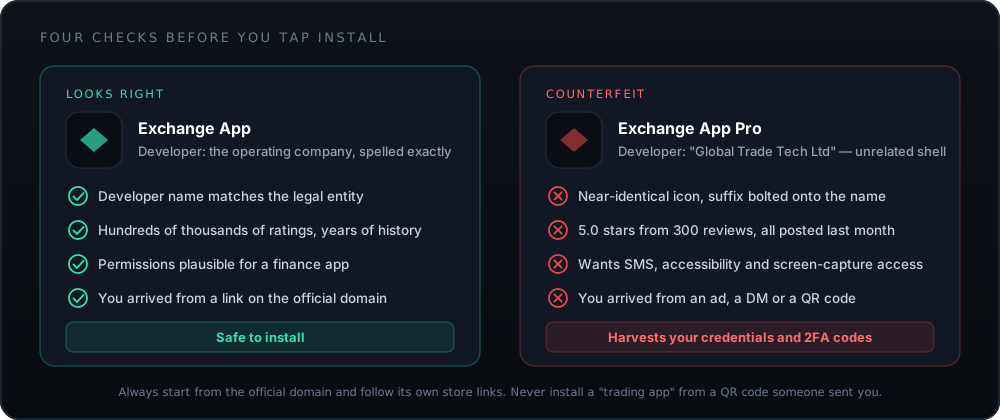
Scroll to the developer line beneath the app title and tap it. You should land on a publisher page belonging to the operating company, with a portfolio consistent with a real exchange — not a single app published by a name you have never seen.
Counterfeits copy the icon and the screenshots perfectly. They cannot copy the publisher account, which is why this is the check that works.
-
Read the review count and history, not the star rating
A genuine exchange app has a very large number of ratings accumulated over years, including plenty of angry ones. A five-star average from a few hundred reviews all posted in the same month is the signature of a fake.
- Sort reviews by Most Recent and read a dozen.
- Check the "Version History" — a real app has years of entries.
-
Confirm the app size and requirements look plausible
A full-featured trading app with charting is a substantial download. A "BitMart" app of a few megabytes is almost certainly a thin wrapper around a phishing web view.
-
Install, then open only from the home screen
After installation, launch the app from your home screen every time. Never resume a session by tapping a link in an email or message — deep links can be spoofed, and the habit of arriving from external links is exactly what phishing depends on.
iOS makes this easier than Android in one important respect: sideloading is heavily constrained on a standard device, so essentially every app arrives through the App Store. That removes the single largest attack surface — but it does not remove counterfeit listings, which is why the publisher check remains the step that matters.
Android: download and verify
-
Reach Google Play through the official website
Same rule as iOS: type
bitmart.cominto the address bar yourself, then follow the Play link published on that page. The official site is the root of trust for every link below it.Android is the primary target for counterfeit finance apps because sideloading exists. The convenience that makes Android flexible is the same property attackers rely on.
-
Verify the developer account and package name
On the Play listing, tap the developer name to see their other apps and the account's registered details. Then scroll to App info and check the package identifier — the reverse-domain string such as
com.bitmart.*.A package name that does not correspond to the company's own domain is disqualifying, no matter how convincing the listing looks.
-
Check the "Data safety" section against common sense
Google requires publishers to declare what they collect. A trading app needs identity and financial data — that is expected. What it does not need is access to your SMS messages, your call log, or accessibility services.
A finance app requesting accessibility service access is a serious red flag. That permission lets an app read and control the screen — including reading your
2FAcodes and authorising actions on your behalf. -
Install and confirm Play Protect is enabled
Open the Play Store, tap your profile icon, then Play Protect, and make sure scanning is on. It is not a substitute for judgement, but it catches known-bad packages and costs nothing.
-
Confirm the installer source after installation
Go to Settings → Apps → (the app) → App details. It should report that the app was installed from the Google Play Store. If it reports another installer, or "unknown source", uninstall it immediately and reinstall from Play.
If an app you believed came from Play reports an unknown installer, treat the device as compromised. Change your exchange password and 2FA from a different device before doing anything else.
The APK question, answered properly
Android's ability to install applications outside Google Play is genuinely useful — in regions where Play is unavailable, it is the only route. It is also the delivery mechanism for the majority of crypto-stealing malware. Both statements are true, so the answer is procedural rather than ideological.
| Source | Risk | Verdict |
|---|---|---|
| Official domain, over HTTPS | Low, if verified | Acceptable when Play is genuinely unavailable. Check the checksum and signing certificate. |
| Third-party APK mirror sites | High | No. Even well-known mirrors re-host binaries they did not build. |
| Telegram, Discord, WhatsApp | Extreme | No, under any circumstances, including from someone you know. |
| QR code on a poster, screen or DM | Extreme | No. You cannot read a QR code with your eyes — that is the entire point of the attack. |
| "Modded" or "premium unlocked" builds | Extreme | No. There is no legitimate reason a modified exchange client exists. |
If you must install an official APK
-
Download only from the official domain, and confirm the padlock
Check that the address bar shows the exact domain with a valid certificate before the download starts. A single transposed character in a domain name is the whole attack.
-
Compare the published checksum
If a
SHA-256hash is published alongside the file, verify it. On a desktop:shasum -a 256 file.apkon macOS or Linux,certutil -hashfile file.apk SHA256on Windows. The output must match character for character.A checksum published on the same page as the download only protects against corruption, not against a compromised site. It is a useful check, not a complete one.
-
Grant install permission narrowly, then revoke it
Android asks which app may install unknown packages. Grant it to your browser only, for this one installation, and revoke it immediately afterwards in Settings → Apps → Special access → Install unknown apps.
-
Verify the signing certificate after installation
Use an APK inspection tool to check the certificate fingerprint against the one on the official version. Signature verification is what proves the binary was built by the company and not merely named after it.
-
Switch to the Play version as soon as you can
A sideloaded app does not receive automatic security updates. If Play access becomes available later, uninstall and reinstall from the store so patches arrive without your involvement.
How fake exchange apps actually work
Understanding the mechanism makes the defence obvious. Counterfeit trading apps come in three families.
1. The credential harvester
A thin shell that renders a pixel-perfect login screen. You enter your email, password and
2FA code; the app forwards them to the attacker in real time, who logs into the real
exchange within the code's thirty-second validity window. The app then shows a plausible error, or
a fabricated balance, while your account is emptied elsewhere.
2. The clipboard hijacker
Malware watches the clipboard for anything shaped like a wallet address and silently substitutes the attacker's. You copy your own address, paste it into a withdrawal form, and the pasted value is not what you copied. This is why you always verify the first and last several characters of an address on the confirmation screen — the paste is exactly where the substitution happens.
3. The fake wallet with a "recovery" prompt
Presents itself as a wallet or a portfolio tracker and asks you to "import" or "validate" an
existing wallet by entering your seed phrase. Every entered phrase is drained
immediately, often within seconds and often automatically.
Harden the device, not just the app
A perfectly genuine app on a compromised phone is a compromised app. Five things, in order of value:
- Keep the OS updated. Mobile exploit chains target known, patched bugs far more often than novel ones. Automatic updates are the single highest-value security setting on the device.
- Do not root or jailbreak a device that touches money. Rooting disables the OS sandbox that separates your banking app from a game you installed last year. If you want a rooted device, keep a second phone.
- Use a screen lock with a real passcode. Six digits minimum, alphanumeric ideally. Biometrics are the convenience layer on top of it, not a replacement for it.
- Set a carrier account PIN. This is your defence against SIM-swap, and it is set with your mobile carrier rather than on the phone. It takes one phone call and it is the reason SMS-based recovery fails for attackers.
- Audit installed apps quarterly. Remove anything you no longer use. Every app is a permission surface, and the ones you have forgotten about are the ones nobody is watching.
Permissions worth refusing
| Permission | Legitimate for a trading app? | What it enables if abused |
|---|---|---|
| Camera | YesQR codes and identity documents | Limited on its own; grant "while using the app" rather than always |
| Photos / files | Yes, narrowlyUploading verification documents | Broad library access exposes screenshots — including any you took of a recovery phrase |
| Notifications | YesLogin and withdrawal alerts | Nothing harmful. Genuinely useful for security events |
| Biometrics | YesApp unlock | Handled by the OS; the app never receives your biometric data |
| SMS / call log | No | Reads one-time codes and intercepts recovery messages |
| Accessibility services | Absolutely not | Full read and control of the screen — the classic banking-trojan permission |
| Display over other apps | No | Draws a fake login form on top of the real one |
| Device admin | No | Resists uninstallation and can wipe or lock the device |
When it will not install
- "App not available in your country"
- Your store account region does not match the app's distribution list. This is a licensing boundary, not a bug. Changing your store region to route around a legal restriction typically breaches both the store's terms and the exchange's — and can leave you unable to withdraw later. Check regional availability before assuming it is a technical fault.
- "Insufficient storage" despite apparent free space
- Installation needs roughly double the app size during unpacking. Clear cached data, retry, and restart the device if the store keeps reporting a stale figure.
- Installs, then closes immediately on launch
- Usually an OS version below the minimum, or a root/jailbreak integrity check failing. Update the OS first. If the device is rooted, use the web platform in a browser — do not disable the check.
- "Package appears to be invalid" (Android)
-
A truncated or tampered
APK. Delete it, and reinstall from Google Play rather than retrying the same file. Do not "try another mirror" — that is how the file got corrupted or modified in the first place. - Login loop after a successful install
-
Clear the app cache and confirm your device clock is set to automatic.
TOTPcodes are time-derived, so a phone whose clock has drifted will generate codes the server rejects — a surprisingly common cause of a "wrong 2FA code" that is not wrong.
The first ten minutes after installing
Do this before you deposit anything. It is the highest-return ten minutes available to you on any exchange.
- Set a unique password, generated and stored by a password manager. Not a variation of one you use elsewhere — credential-stuffing attacks work precisely because variations are predictable.
-
Enable authenticator-based
2FAand store the backup codes offline, on paper, not in a screenshot on the same phone. - Set the anti-phishing code. Every genuine email from the exchange then carries a phrase only you and the platform know, which makes forgeries immediately obvious.
- Turn on withdrawal address whitelisting, and add your own wallet address as the first entry.
-
Complete
KYCnow, while it is not urgent. Discovering an unverified withdrawal ceiling on the day you want to exit is a bad day. - Send a test withdrawal of the minimum amount to your own wallet, and confirm it arrives. Do this before there is anything meaningful at stake.
Each of those steps is covered in detail in the login and 2FA hardening guide, which is the natural next read. If your next step is funding the account instead, start with the debit-card guide — it covers the charges that appear on the confirmation screen and the ones that do not.
Frequently asked questions
Where can I download the BitMart exchange app safely?
Only from the Apple App Store or Google Play, and only by following the links published on the official website at bitmart.com, which you should reach by typing the address yourself.
The store is not the trust anchor — the official domain is. Counterfeit apps do get onto both stores; they cannot get onto the company's own website.
Is there a BitMart APK for Android?
Exchanges sometimes publish a direct APK for users in regions where Google Play is unavailable. If you use one, download it only from the official domain over HTTPS, verify any published checksum, and check the signing certificate after installation.
APKs from mirror sites, forums, Telegram groups or file-sharing links are the single most common delivery route for credential-stealing malware in crypto. There is no version of "I found the APK on a download site" that ends well.
How do I know if a BitMart app is fake?
Four tells, in order of reliability:
- Publisher account does not match the operating company.
- Review history is short, uniformly positive and recent.
- Permissions include SMS, call log, or accessibility services.
- You arrived from an ad, a DM, a QR code or a search result rather than from the official site.
Icons, screenshots and descriptions are copied perfectly by counterfeiters. Publisher identity and account history are not.
Can I use BitMart without installing the app?
Yes — the web platform runs in any modern browser, and for security-conscious users that is often the better choice. A browser gives you a visible address bar, so you can confirm the domain on every visit, and it supports password managers and hardware security keys more reliably than an in-app web view.
The app's advantages are push notifications for security events and biometric unlock. Both are real; neither is essential.
The app will not install or keeps crashing — what now?
Work through the ordinary causes first: insufficient storage, an OS version below the app's minimum, a region mismatch on your store account, or a corrupted partial download. Clearing the store app's cache and retrying resolves most cases.
If it installs but crashes at launch on a rooted or jailbroken device, that is usually deliberate — finance apps commonly refuse to run where the OS security model has been disabled. Do not "fix" this by disabling the check. Use the web platform instead.
Should I let the app use Face ID or a fingerprint?
Yes. Biometric unlock protects the app if your unlocked phone is picked up, and it makes a strong, unique password practical because you are not typing it constantly.
It is not a replacement for 2FA on withdrawals. Biometrics guard the device; 2FA guards the account. You want both — see the login and 2FA guide.