What Apple Pay actually is in this context
Apple Pay is not a payment method. It is a secure presentation layer over a card you already have. When you authenticate with Face ID, your device sends a Device Account Number — a token unique to that device and card — plus a one-time cryptogram. The merchant and the payment processor never receive your actual card number.
Understanding that one fact answers most of the questions people have about it:
- Why the fee is the same. Same card, same network, same processor, same interchange. Apple Pay changes how the number travels, not what the transaction costs.
- Why it can be declined even though the card works. The decline comes from your issuer or the on-ramp, based on the underlying card and the merchant category — Apple is not making that decision.
- Why it is genuinely more secure. A merchant data breach cannot leak card numbers that were never transmitted. This is a real, meaningful improvement.
- Why it is not private. Your bank sees the charge, and the exchange holds your verified identity. Only the merchant's view of your card number changes.
The trade-off worth naming: Apple Pay removes friction, and friction is the last thing standing between an impulse and a purchase. On a volatile asset, that matters. Set your amount before you open the app, not while the chart is moving.
What you need first
- An Apple device with Wallet configured. iPhone, iPad, or a Mac with Touch ID. The Apple Pay button only appears in Safari or a native iOS app.
- An eligible card in Wallet. Standard debit or credit, issued in your own name. Prepaid and virtual disposable cards are usually refused by crypto on-ramps.
- A verified exchange account.
KYCcomplete, at a tier that permits card purchases. - A supported region. Set by the payment provider, and not always the same as the set of countries the exchange itself serves.
- A destination wallet address ready. Decide where the crypto is going before you buy it.
Buying with Apple Pay, step by step
-
Confirm the card in your Wallet is one the on-ramp accepts
Apple Pay is a container, not a funding source. The charge lands on whichever card is selected inside it, and that card faces exactly the same acceptance rules as if you typed its number manually.
Open Wallet, check which card is set as default, and make sure it is a standard debit or credit card in your own name — not a prepaid card, not a virtual disposable number, and not a card issued to somebody else.
-
Verify your exchange account before you begin
Card-rail purchases require completed
KYC. Doing this in advance matters more here than elsewhere, because Apple Pay flows are fast and quote windows are short — you do not want to be photographing a passport while a price expires. -
Open the buy flow on an Apple device
The Apple Pay option appears only on Apple hardware: in the iOS app, or in Safari on an iPhone, iPad or Mac with the Wallet configured. It will not show up in Chrome on Windows, and its absence there is not a fault.
Select the currency, the asset and the amount.
-
Read the quote screen before authenticating
This is the step Apple Pay makes easiest to skip, because Face ID is right there and it feels like the flow is already finished. It is not. Before you double-click anything, check three numbers:
- The total that will be charged.
- The itemised processing fee.
- The quantity of crypto you receive.
Divide the total by the quantity. That is your effective price — compare it with the market rate.
Biometric confirmation is instant and final. There is no review screen after Face ID. Read the numbers first, every time.
-
Authenticate with Face ID, Touch ID or your passcode
Double-click the side button (or use Touch ID on older devices and Macs) and authenticate. Apple transmits a device-specific token rather than your actual card number — the merchant never sees the real digits.
If your bank applies additional verification, approve it promptly in the banking app.
-
Confirm the credited balance, then move it off the exchange
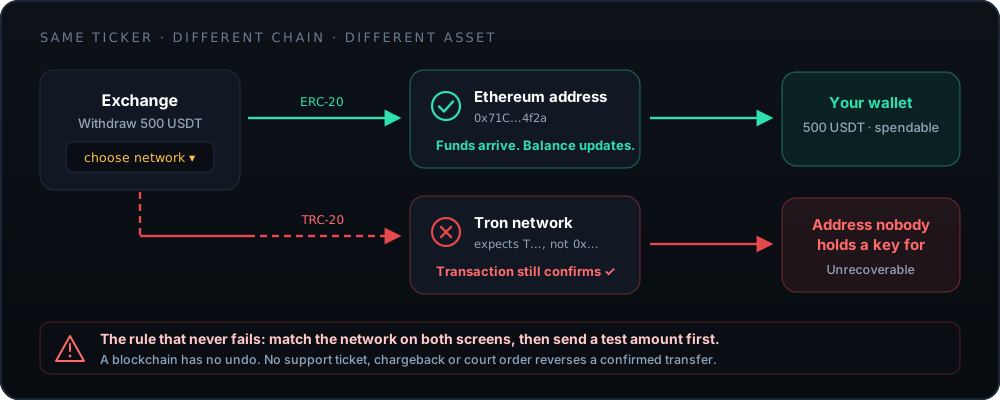
Check the quantity credited against the quote, and keep the confirmation for your records. Then withdraw anything you are not actively trading to a wallet you control — select the network carefully and send a test amount first.
The network you select on the withdrawal screen must match what your receiving wallet supports. A mismatch produces a confirmed transaction that nobody can reverse.
Does Apple Pay cost more than a card?
No — and it does not cost less either. Same rail, same price. The useful comparison is not Apple Pay versus manual card entry; it is card versus bank transfer, and that comparison is not close.
| Method | Speed | Cost | Card number exposed? | Best for |
|---|---|---|---|---|
| Apple Pay | Instant | Card-rail pricing | No — tokenised | Small, urgent purchases on an Apple device |
| Manual card entry | Instant | Card-rail pricing | Yes — to the processor | Same, on non-Apple devices |
| Bank transfer | 1–3 business days | Lowest available | N/A | Anything of meaningful size |
| Stablecoin deposit | Minutes | Network fee only | N/A | Moving value you already hold on-chain |
The pattern is consistent across every exchange, not just this one: you pay a premium for instant settlement on a card rail. That premium is worth it for a $100 purchase you want to make right now. It is a poor trade on $5,000.
The one genuine advantage: card-number privacy
This is worth taking seriously rather than dismissing. When you type a card number into a payment form, that number exists — however briefly — in the processor's systems. Payment processors are breached. Tokenisation means there is nothing useful to steal: the Device Account Number is bound to your specific device and useless anywhere else.
For crypto on-ramps specifically, that matters more than usual. These processors are high-value targets, they handle a customer base that is disproportionately attacked, and the merchant category attracts fraud attention from every direction. If Apple Pay is available and your alternative is typing the number, take it.
When the button is missing or the payment fails
- The Apple Pay button does not appear at all
- Check in order: are you on an Apple device; are you in Safari rather than another browser; is a card actually set up in Wallet; is your region supported by the processor; is your verification tier sufficient. Five of those you can confirm yourself in under a minute.
- Payment declined immediately
- The underlying card was refused. Most often the issuer blocks cryptocurrency merchant categories — call the number on the back of the card and ask directly. It is also worth confirming the card is not prepaid or virtual.
- Authentication succeeds, then the purchase fails
- Usually the quote expired between authentication and settlement, or the on-ramp's own limits were exceeded. Any authorisation hold on the card releases on its own, typically within a few business days.
- "Card not eligible for this merchant"
- The processor's own rules, not Apple's. Try a different card in Wallet, or use a bank transfer instead.
- Charged but no crypto credited
- Wait fifteen minutes for settlement, then open a support ticket from inside your account with the transaction reference. Do not file a chargeback as a first step — it will be contested and it commonly ends with the account frozen.
- Face ID prompt does not appear
- Restart the device and confirm Apple Pay works elsewhere — a small purchase somewhere familiar is the quickest test. If it fails everywhere, the issue is the Wallet configuration rather than the exchange.
After the purchase: the part that matters
You now hold an entry in an exchange's database. Converting that into an asset you actually own takes one more step.
If the card rail felt expensive — it is — the debit-card guide works through the full fee arithmetic and the cheaper alternatives. If you are wondering why PayPal is not simply an option here, the PayPal guide explains the reversal problem that keeps it off most exchanges. And before you leave a balance sitting, the full review covers who you are trusting with it.
Frequently asked questions
Can you use Apple Pay on BitMart?
Apple Pay appears where the platform's third-party payment provider supports it and where your region and card are eligible. It is not a separate funding method in its own right — it is a faster way to present a card you already hold.
The definitive check is your own buy screen on an Apple device: if the Apple Pay button renders, it is available to you. Regional support is set by BitMart and its payment partners; see bitmart.com for current terms.
Is Apple Pay cheaper than entering card details?
No. It is the same card on the same rail through the same processor, so the fee structure is identical. What Apple Pay changes is friction and privacy, not price.
If you want a cheaper route, the lever is the rail itself — a bank transfer rather than any card-based method. That is where the real saving is.
Why is the Apple Pay button not showing?
Six causes, in rough order of likelihood: you are not on an Apple device or not in Safari; no card is set up in Wallet; your region is not supported by the payment provider; your account verification tier does not permit card purchases yet; the card in Wallet is a type the processor refuses; or the provider has temporarily disabled the method.
Work through them in that order before contacting support — five of the six you can fix yourself in under a minute.
Does Apple Pay hide my identity from the exchange?
It hides your card number from the merchant, which is a genuine and worthwhile security improvement — a merchant breach cannot leak digits it never received. It does not make the purchase anonymous.
The exchange still holds your verified identity from KYC, and the transaction is still recorded on your bank statement. Apple Pay is a card-security feature, not a privacy tool.
Can I use Apple Cash or an Apple Card for crypto?
Apple Cash is generally not usable for cryptocurrency purchases, and the Apple Card is subject to the same issuer restrictions as any credit card — many issuers block crypto merchant categories or treat such purchases as a cash advance.
Separately, we would steer you away from any credit product for buying volatile assets. Borrowing to buy something that can fall 60% is a well-documented route to real harm.
The payment succeeded but no crypto arrived. What now?
Wait fifteen minutes first — settlement between the processor and the exchange is not always instantaneous, and most "missing" purchases simply have not landed yet.
If it still has not appeared, open a support ticket from inside your account with the transaction reference from the confirmation and the amount and time. Do not file a chargeback as a first step: it will be contested, and it commonly results in the exchange account being frozen while a resolvable issue was already in progress.