How exchange login actually works
Worth thirty seconds, because it explains every recommendation below. When you sign in, three separate things happen:
- Authentication. The password proves you know a secret. Passwords leak, so this alone is weak.
- Second factor. A
TOTPcode, SMS message or hardware key proves you possess something. This is what stops a leaked password being sufficient. - Session issuance. The server hands your browser or app a session token. From that moment, the token is your identity — not the password, not the code.
Step three is the part people miss, and it explains two things at once. It is why an attacker who phishes your password and a live 2FA code can operate for as long as the stolen session lasts. And it is why withdrawal whitelisting matters so much: whitelisting constrains what a valid session is permitted to do, which is the only control that still bites after authentication has already been defeated.
Hardening sign-in: six settings, about twelve minutes
-
Give the account a password nothing else shares
Generate it in a password manager — twenty characters or more, random, never typed from memory. The threat here is not somebody guessing it; it is credential stuffing, where a password leaked from an unrelated site years ago is replayed against every exchange in an automated sweep.
If your exchange password is a variation on a password you use elsewhere, it is already in scope for that attack.
-
Enable authenticator 2FA, and photograph nothing
Use a
TOTPapp — Aegis, Raivo, 2FAS, Ente Auth or your password manager's built-in generator. During setup you are shown a secret key or QR code. Write the key down on paper and store it somewhere physically safe.Do not screenshot it. A screenshot lives in a cloud photo library that syncs to every device you own, which is the exact opposite of a second factor.
If you only ever set up the authenticator on one phone and that phone dies, you will need the account-recovery process. The paper backup is what turns a catastrophe into an inconvenience.
-
Turn off SMS as a login factor wherever you can
SIM-swap is not exotic. An attacker calls your carrier, impersonates you with details harvested from social media and past breaches, and has your number ported within the hour. Every SMS code then arrives on their device.
Where SMS cannot be removed entirely, at minimum set a carrier account PIN or port-freeze with your mobile provider — that is the control that actually blocks the attack.
-
Set the anti-phishing code
This is an underused feature and it is excellent. You choose a phrase; the exchange includes it in every genuine email it sends you. A forged "urgent security alert" cannot contain it, because the attacker does not know it.
Pick something distinctive that you will notice the absence of. Then make a habit of looking for it.
-
Enable withdrawal address whitelisting
With whitelisting on, funds can only be withdrawn to addresses you pre-approved, usually with a cooling-off period before a new address becomes usable. Even a fully compromised, logged-in session cannot send your funds to an attacker's address.
This is the single most effective setting on any exchange account, and it is the one almost nobody enables.
Add your own wallet address to the whitelist before you need it, and verify it by sending a minimum test amount first.
-
Review active sessions and API keys
In security settings, look at logged-in devices and terminate anything you do not recognise. If you have ever created an
API key— for a trading bot, a portfolio tracker, a tax tool — review it now.- Delete keys you no longer use.
- Ensure no key has withdrawal permission unless you genuinely need it.
- Restrict every key to a specific IP address where the platform allows it.
An
API keywith withdrawal rights and no IP restriction is a bearer instrument for your entire balance. It bypasses your password and your 2FA completely.
The 2FA ladder: not all second factors are equal
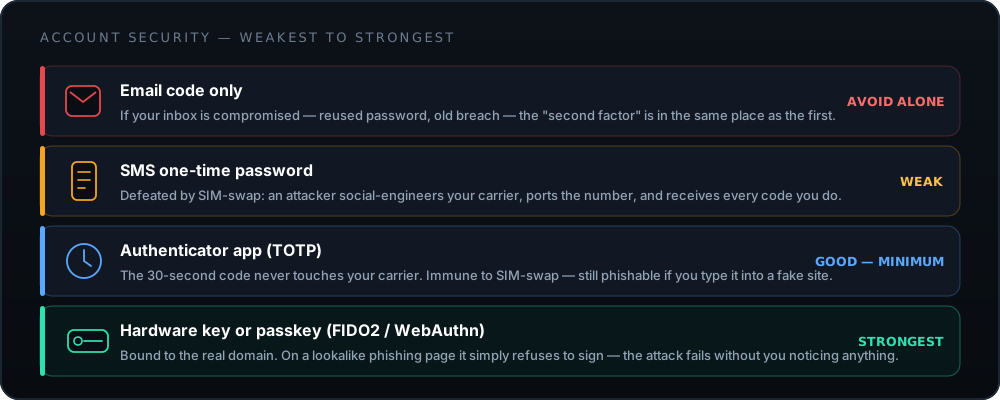
| Method | Stops a leaked password? | Stops SIM-swap? | Stops real-time phishing? |
|---|---|---|---|
| Email code | Only if the inbox is separately secured | Yes | No |
| SMS one-time password | Yes | No | No |
| Authenticator app (TOTP) | Yes | Yes | No — the code is still typeable into a fake page |
| Hardware key / passkey (FIDO2) | Yes | Yes | Yes — the key is bound to the real domain |
The right-hand column is the one worth staring at. A TOTP code is a genuine
improvement, but it is still a string you can be tricked into typing somewhere. A FIDO2 key
performs a cryptographic handshake tied to the actual domain, so on bitmart-verify.co
it simply declines to sign — and the attack fails silently, without depending on you noticing
anything. Where a platform supports a security key or passkey, that is the option to
choose.
Spotting a fake login page
Modern phishing kits proxy the real site in real time. You see genuine content, because you are looking at genuine content — relayed through an attacker who is capturing everything you type, including the 2FA code, and replaying it instantly.
Which means visual inspection is nearly useless. What still works:
- Read the domain, character by character, every time. Not the padlock — every
phishing site has a valid certificate. The domain. Watch for hyphens, extra words, and
unusual top-level domains:
bitmart-login.net,bitmart.support,bitmart-verify.com. - Let a password manager decide. This is the underrated defence. A password manager fills credentials only on the domain it saved them for. If it does not offer to fill, that is not an inconvenience — that is the alarm.
- Check the anti-phishing code in every email. Missing phrase, forged email. No further analysis required.
- Distrust urgency. "Suspicious activity — verify within 24 hours or your account will be frozen" is a manufactured deadline designed to stop you thinking. Real security notices do not require you to click a link in the message; you can always navigate to the site yourself and check.
The habit that makes all of this automatic: never navigate to a financial site by clicking. Bookmark it once, and reach it only from the bookmark. If a message claims something urgent, open your own bookmark and look — the real notice will be waiting for you inside the account.
Locked out: lost or broken authenticator
This is the most common lockout by a wide margin — a replaced phone, a factory reset, an authenticator app deleted during a clear-out.
-
Stop and check whether you actually have the backup
Before starting a recovery process, look for the paper you wrote the
TOTPsecret on, or check whether your authenticator app has an encrypted cloud backup you can restore on a new device. Recovery via support takes days; restoring from a backup takes two minutes. -
Check whether your device clock has simply drifted
If codes are being rejected rather than unavailable, this is the usual culprit.
TOTPis derived from the current time, so a phone whose clock is off by more than about ninety seconds produces codes the server will not accept.Set the date and time to automatic on the device generating the codes, then try again. This resolves a large share of "my 2FA stopped working" cases.
-
Start recovery only from the official site, typed by hand
Go to
bitmart.comby typing it, sign in, and use the account-recovery flow inside the platform. Do not search for "bitmart 2fa reset" — those results are heavily targeted by phishing operators precisely because the people clicking them are already locked out and anxious.Nobody from any exchange will contact you first to help with a lockout. If somebody messages you offering to restore access, they are the attack, not the rescue.
-
Prepare the identity evidence before you file the ticket
Expect to prove you are the account holder. Typically that means a government ID matching the name on the account, a selfie or short video following on-screen instructions, and details only the owner would know — approximate registration date, recent transactions, deposit methods used.
Having this ready in the first message shortens a multi-day process considerably.
-
Expect a mandatory security hold, and plan around it
After a successful 2FA reset, withdrawals are normally frozen for a fixed period — often 24 to 48 hours. This is a feature, not obstruction: it is the window in which a real owner can react if an attacker was the one who reset the factor.
-
Re-secure everything the moment access returns
Set up 2FA again on a device you control, write the new secret on paper, rotate the password, review active sessions and API keys, and confirm the withdrawal whitelist still contains only your addresses.
Other lockout scenarios
- Password forgotten, 2FA intact
- The straightforward case. Use the password-reset flow on the site, confirm through your email, and complete the 2FA challenge. Expect a short withdrawal hold afterwards — again, that hold is protecting you.
- Email address no longer accessible
- Harder, because email is the root of most recovery flows. You will need full identity verification. Fix the underlying problem first: make sure your email account itself has strong, non-SMS 2FA, since whoever controls your inbox effectively controls every account recoverable through it.
- Account frozen pending review
- Compliance reviews are triggered by patterns — an unusual deposit route, a login from a new country, a transfer profile that matches a monitoring rule. Respond to the request promptly and completely. Vague or partial answers extend the hold; they never shorten it.
- "Too many failed attempts"
- A temporary rate limit, normally clearing within an hour. If you did not make those attempts, somebody else is trying your password — change it immediately from a device you trust, and check whether that password appears in a known breach.
- Login works, withdrawals refused
-
Almost always a
KYCtier limit, a whitelist cooling-off period, or a paused network for the specific asset. Check all three before assuming something is wrong with the account.
If you think you are already compromised
Order matters here. Do these in sequence, from a device you are confident is clean.
- Secure the email account first. Everything else is recoverable through it. New password, verify its 2FA, and check for forwarding rules or filters an attacker may have added to hide alerts from you.
- Change the exchange password and terminate all sessions. Terminating sessions is the step people forget — a new password does not automatically invalidate a token already issued to the attacker.
- Rotate 2FA. Remove the existing authenticator entry and enrol a new one. Assume the old secret is known.
- Delete every API key. All of them. Recreate only what you actually need, with the narrowest permissions and an IP restriction.
- Check the withdrawal whitelist. If an unfamiliar address is on it, remove it and report the compromise to the exchange through a ticket you open yourself.
- Then examine the device. Where did the compromise come from? A malicious browser extension, a sideloaded app, a reused password, a phishing page? Until you know, a clean account on a dirty device is compromised again by morning.
Ongoing hygiene: a quarterly ten minutes
- Review active sessions and terminate anything unfamiliar.
- Audit API keys — delete the unused, restrict the rest.
- Confirm the withdrawal whitelist matches wallets you still control.
- Check your email address against a breach-notification service, and rotate anything that appears.
- Confirm your authenticator backup is still where you think it is, and still legible.
- Verify your carrier account still has a PIN or port-freeze applied.
Done properly, none of the above is dramatic — which is the point. Account security is a maintenance task, not a heroic one. If you have not yet installed the app, do the download verification checks first; if you are weighing whether to keep a balance here at all, the full review is the honest version of that answer. Details on how BitMart's own security controls are documented are published at bitmart.com.
Frequently asked questions
What is the correct BitMart login page?
The sign-in form on the official domain, reached by typing bitmart.com into the address bar yourself, or through the app you installed from that site. Bookmark it after the first successful login and use only the bookmark afterwards.
Never reach a login page from an email, a message, a QR code or a search advertisement. Phishing operators buy ads against exchange brand names, and a cloned login screen is visually indistinguishable from the real one.
Why does BitMart keep asking for a verification code when I log in?
Usually because the platform sees the login as coming from a new context: a new device, a cleared cookie jar, a different browser, a VPN exit node, or an unfamiliar IP address. Each of those legitimately triggers step-up verification.
If you are being asked repeatedly on a device you use daily, check whether your browser is clearing cookies on close, or whether a VPN is rotating your apparent location between sessions.
I lost my phone with the authenticator app. Can I still get in?
Yes, through account recovery — it is slower and more invasive than you would like, but it exists. You will need to verify your identity with documents and answer questions about the account, and there is normally a withdrawal freeze of a day or two afterwards.
The recovery process is the reason to keep that TOTP backup key on paper. With it, you restore access in minutes. Without it, you file a ticket and wait. Full walkthrough in the recovery section above.
Is it safe to log in on public Wi-Fi?
Less dangerous than it used to be — HTTPS is now universal, so a café network cannot read your traffic. The residual risks are shoulder-surfing, a malicious captive portal, and DNS manipulation pointing you at a lookalike domain.
If you must, use your phone's cellular data or a personal hotspot rather than the venue's network, and confirm the domain in the address bar before typing anything. Never perform a withdrawal on a network you do not control.
Should I stay logged in?
On a personal device with full-disk encryption and a strong screen lock, staying signed in is a reasonable trade — it reduces how often you type credentials, which reduces phishing exposure.
On any shared, borrowed or work device, sign out every time and use a private window. And regardless of device, review the active-session list periodically and terminate anything unfamiliar.
Can BitMart support reset my password over email or chat?
Password resets go through the platform's own automated flow, not through a person. Legitimate support will never ask for your password, your 2FA code, or your seed phrase — and will never initiate contact with you about a lockout.
Any unsolicited message offering account recovery is a scam, without exception. Real support responds to tickets you opened, from inside an account you reached by typing the domain.